Imagine you are testing a recipe with too many dials.
More heat. Less salt. Longer simmer. Different pan. One version tastes fantastic, so you write it down and feel brilliant for about nine seconds.
Then you try it again in a different kitchen.
The sauce splits.
Strategy research gets uncomfortable here. A backtest can look wonderful under one exact set of conditions. A batch can show that nearby settings also worked. A real research question keeps going:
Did this idea survive when I changed the market, the timeframe, the date range, the fees, or the nearby parameter ranges?
Study is built to follow that question.
Study is currently available only on the Pro 5x plan. It is designed for larger research workflows where a trader runs multiple related batches and collects evidence across them.
If you want the first-principles version of why one great row can fool you, start with Why One Backtest Can Lie to You. If you want the deeper math behind stable regions inside one batch, read Atlas: Finding the Shape of a Strategy. Study takes that same instinct and stretches it across a whole research session.
What one batch can show
One batch backtest answers a narrow question:
Across this grid, in this context, which settings looked useful?
A Study asks a broader one:
Across all the batches I have run for this strategy, which parameter neighborhoods keep making sense?
A sorted table is good at finding the winner. It is less good at telling you whether the winner had any neighbors, whether the neighbors appeared in other packs, whether ETH agreed with BTC, whether 2h agreed with 4h, or whether one old date range carried the entire story.
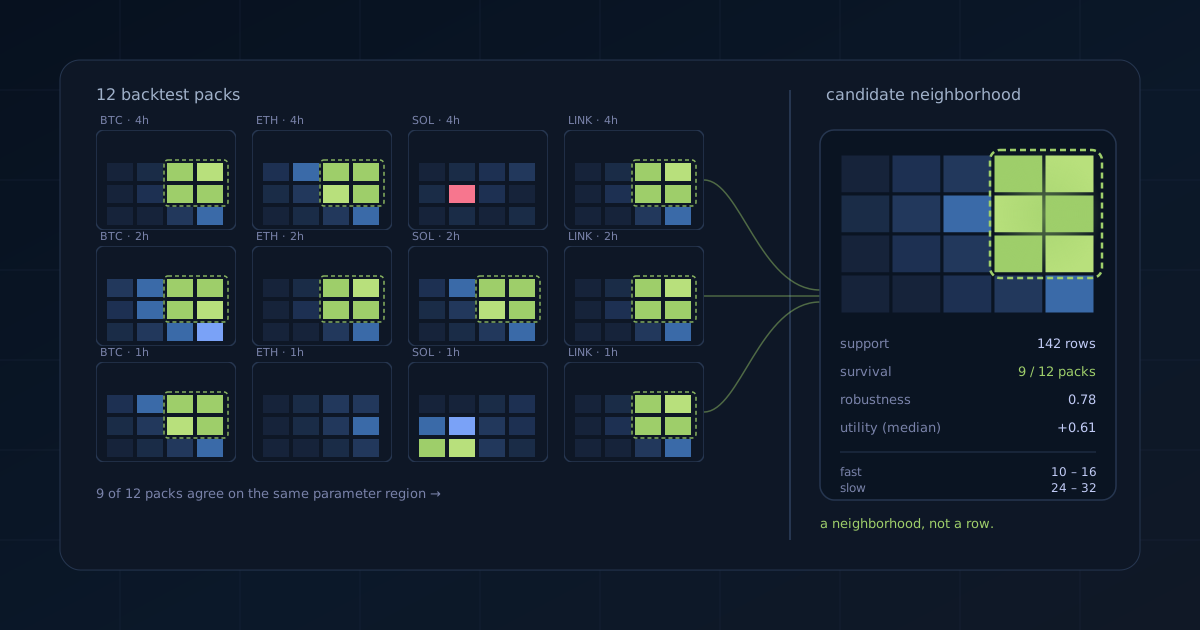
Study turns those separate batches into a research object. It keeps the tests together, keeps their metadata visible, scores rows under a shared objective, and searches for parameter neighborhoods that survive more than one context.
A Study is a research notebook
It is tempting to think of Study as a place where many result tables get poured into one larger result table.
That would be tidy, but it would miss the point.
A Study is closer to a lab notebook. Each Backtest Pack is one experiment. Some experiments are broad and exploratory. Some are narrow follow-ups. Some test the same region on another asset. Some test whether a promising range falls apart when the timeframe changes.
The notebook matters because research gains meaning from sequence:
- You find a promising region.
- You notice where evidence is missing.
- You run the next test.
- You add it back to the Study.
- You see whether the region still holds.
The loop matters more than the first top row.
Define the objective first
Before Study can decide which neighborhoods are promising, it needs an objective.
You have to tell the notebook what kind of evidence you care about.
For a trend-following strategy, you might reward total return or final value while punishing max drawdown and tiny trade counts. For a smoother strategy, you might care more about drawdown, volatility, or Sharpe. For any strategy, you may want to filter out results with too few trades before they get a chance to look heroic.
Study’s V1 objective controls are intentionally simple:
- Primary: the main thing to maximize.
- Risk: the main thing to penalize.
- Win Rate: an optional supporting quality metric.
Under the hood, Study turns rows into utility scores. That helps compare results across packs where raw values may not mean the same thing. A 40% return on one asset, date range, and timeframe is not automatically the same kind of evidence as 40% somewhere else.
| If the result says… | Study asks… |
|---|---|
| This row had the best return. | Did nearby rows also work? |
| This pack looked strong. | Did other packs test the same region? |
| This region survived BTC 4h. | Did it survive another asset, timeframe, or date range? |
| This candidate has a warning. | What should we test next? |
Candidate Neighborhoods
The central object in Study is a Candidate Neighborhood.
A Candidate Neighborhood is a connected region of parameter space with supporting rows.
It has a center, a range of tested values, representative rows, row support, cross-pack survival, a robustness score, and warnings when the evidence looks thin.
A setting can win by being lucky. A neighborhood has to bring witnesses.
Suppose one row says:
fast=12,slow=26,stop=2.0returned 84%.
That is interesting. But a stronger research statement sounds like this:
The area around
fast=10-16,slow=24-32, andstop=1.8-2.4stayed useful across several packs, had good median utility, and did not depend only on the single best row.
The second statement gives you something sturdier to test. It also gives you something easier to distrust when the evidence is weak.
Testing a neighborhood across packs
Inside one batch, a region can look strong because the whole context favored it.
Cross-pack survival asks a harder question:
When the context changes, does the region still show up?
For each candidate and each pack, Study can ask:
- Did this pack cover the candidate’s parameter range?
- How many rows supported it?
- What percentile did it achieve?
- Did it pass the selected constraints?
- Was a required parameter or metric missing?
If a candidate survives BTC 4h, ETH 4h, and LINK 4h, that is different from surviving only BTC 4h. If it works in one date range and fails in another, that tells you where the question moved. If it survives before fees but fails after fees, the fees changed the result.
| Pattern | What it means |
|---|---|
| Strong in many overlapping packs | Worth deeper inspection. |
| Strong in one pack only | Possibly context-specific. |
| Good median, weak worst pack | Study the failure case. |
| Great best row, poor p25 | The region may be spiky. |
| Missing coverage | Run the missing test before trusting the candidate. |
Candidates do not need to survive everywhere. Markets differ, timeframes differ, and some strategies should specialize. The claim should match the contexts that survived.
“This worked on BTC 4h in one window” is a claim.
“This parameter family survived overlapping tests across several contexts” is a different claim.
Study helps keep those claims from blurring together.
Warnings point to the next test
Study includes fragility warnings because research needs friction.
Some warnings point to thin evidence:
thin support: too few rows support the region.narrow pack survival: too few packs agree.spiky neighborhood: the best row is much better than the lower quartile.missing tested coverage: some packs did not test the region or schema.
These warnings point to the next test rather than disqualifying a candidate automatically.
Thin support means broaden or densify the grid. Narrow survival means test more contexts. A spiky neighborhood means stop staring at the champion row and inspect the lower quartile. Missing coverage means the next batch is obvious.
A warning is where the next useful test begins.
Four views of the research
Study has several tools because no single view can explain a research set.
The Overview is where Candidate Neighborhoods live. It is the place to compare stable regions, representative rows, survival, and warnings.
The Ledger is the notebook’s table of contents. It lists every Backtest Pack, its metadata, row counts, parameter counts, metric counts, compressed size, and whether the pack is included.
The Sensitivity view asks which parameters move utility the most. That overlaps with the ideas in Influence: Which Knobs Move the Result?, where we explain sensitivity analysis, main effects, and interactions more carefully.
The Curves view asks what happens as one parameter changes. Look for plateaus, cliffs, dead zones, and narrow spikes.
The Heatmaps view asks whether two parameters only make sense together.
The Pareto view asks what tradeoffs remain when one metric improves and another gets worse. For the deeper version, see Frontier: When Better Depends On What You Refuse To Lose.
The Coverage view asks where the evidence is missing. This may be the most practically useful view when planning the next batch.
The Health view asks whether the Study itself is clean: how many rows it has, how large it is, how many candidates exist, and whether duplicate packs may be distorting the evidence.
The views reduce to four questions:
- What regions look promising?
- What evidence supports or weakens them?
- Which parameters explain the shape?
- What should I test next?
Preserving the research context
Study uses .tbpack for Backtest Packs and .tbstudy for whole Studies.
The file format becomes relevant when you try to keep large research sets alive in ordinary CSV and JSON files.
CSV and JSON are useful for compatibility, but they often need help identifying parameter and metric columns, the symbol and timeframe, and duplicate packs.
Native packs preserve more of that structure from the beginning. They also store numeric columns more compactly than a giant table of row objects. The user-facing benefit is simple: Study can handle larger research sessions while keeping the metadata visible enough to repair when needed.
The metadata matters because bad labels can poison good analysis. If ETH is mislabeled as BTC, or a metric column is treated as a parameter, the map is wrong before the math even starts.
Choosing the next test
Study turns a promising candidate into a next test:
- If Candidate #3 has no ETH 4h coverage, run ETH 4h around that region.
- If a parameter is highly sensitive, run a denser sweep around the promising values.
- If a region survives BTC but fails LINK, retest nearby ranges before trusting it.
- If packs do not overlap, run a comparable range before comparing them too confidently.
- If a duplicate pack is inflating support, exclude one copy.
Collecting results says:
Here are the rows I found.
Research says:
Here is the next question that would make my belief less flimsy.
What Study keeps visible
Study does not make historical results predictive. Its job is to keep the research trail honest.
It helps separate a spike from a neighborhood, a single context from cross-pack survival, an exciting result from a supported one, and a missing test from a reassuring conclusion.
The useful outcome is:
We found a parameter family, tested its weak places, understood its tradeoffs, and know why it still deserves attention.